Betaflight App
The Betaflight App (formerly Betaflight Configurator) is used to configure settings for flight controllers running Betaflight Firmware. This section of the documentation covers how to use the App itself, as well as how to use the various tabs and features it offers.
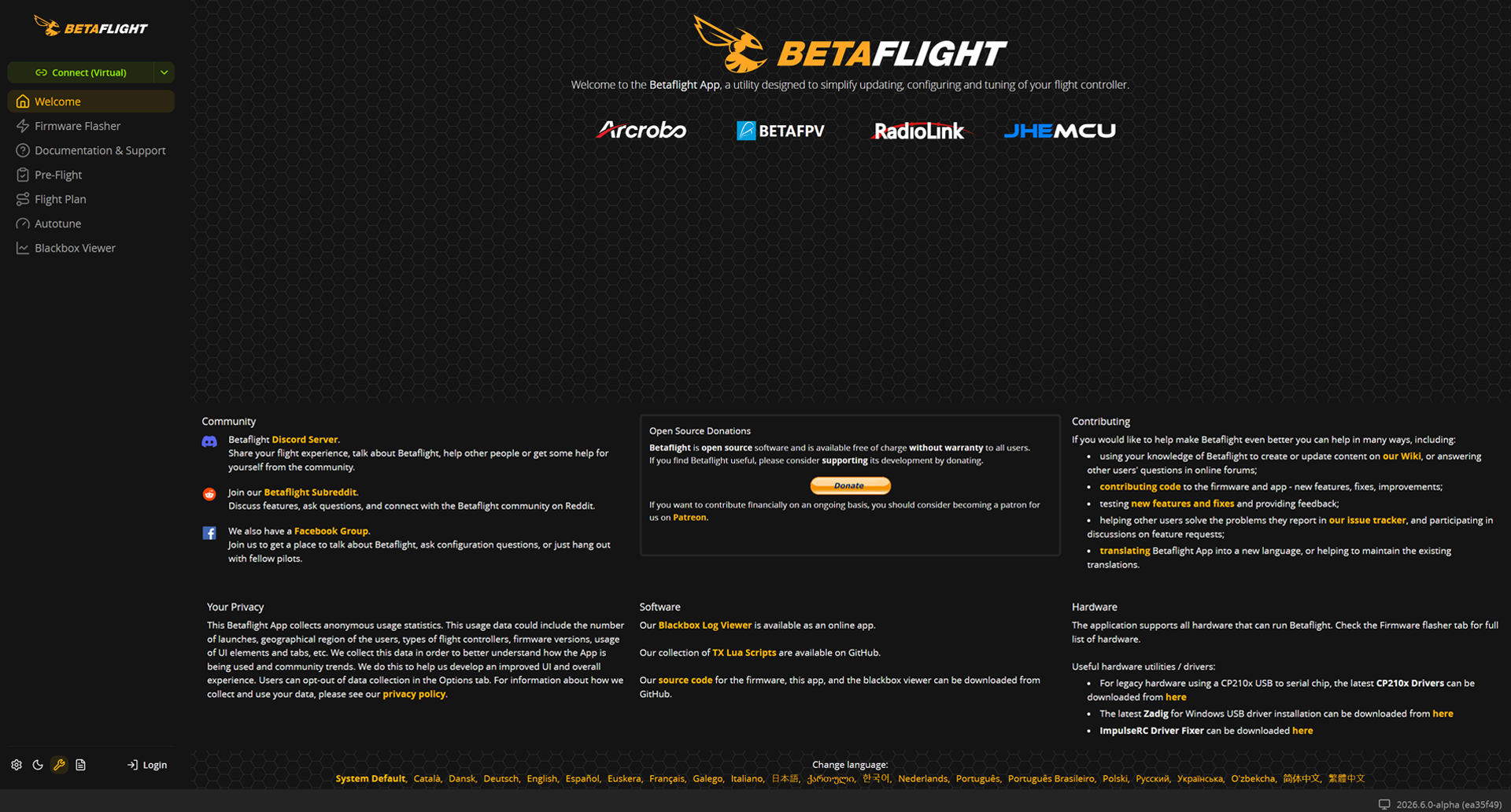
Usage
The latest version of the Betaflight App is available on https://app.betaflight.com for PC, or as a native app for Android that can be downloaded from the most recent release on the releases page.
- The 10.10.0 release of the Betaflight App is compatible with Betaflight Firmware from 4.5.3 down to 4.2.x
- The 2025.12.1 release of the Betaflight App is compatible with Betaflight Firmware 2025.12.x, 4.5.x down to 4.3.x
The web-based App (2025.12.1 and forward) requires a Chromium-based desktop browser with support for the WebUSB API, WebSerial API and optionally the Web Bluetooth API. You can use Chrome or Edge, those are the most common Chromium-based browsers that you'll most likely already have installed. For those who don't want to use proprietary versions of Chromium, you can use your own preferred open-source alternatives based on Chromium, such as ungoogled-chromium, Thorium or Helium.
More heavily modified (and especially privacy-focused) browsers - such as Brave - may not work reliably even though they're based on Chromium due to the aggressive security settings they often have enabled by default. The App should still work overall, but some features may not behave as expected. If you experience issues, please try using a different browser first before reporting an issue.
The new App releases are built as a PWA (Progressive Web App - [Wikipedia], [MDN] ). In short, this means that even though it's a web app, it can be used fully offline, and you can further install it from the browser search bar and it will show up and work as a regular app on your desktop or mobile device.

Previous versions of the App are available for download from the releases page only as native programs for Windows, macOS, Linux and Android.
Connecting to your Flight Controller
There are multiple ways to connect the App to your flight controller. Wired via USB, or wireless via Bluetooth or ELRS Wi-Fi TCP/IP.
- USB - Web App
- Bluetooth - Web App
- USB - Native App
- ELRS - Native App
-
When you first connect a flight controller, you will need to select the
I can't find my USB devicefrom the port selection dropdown in the top right.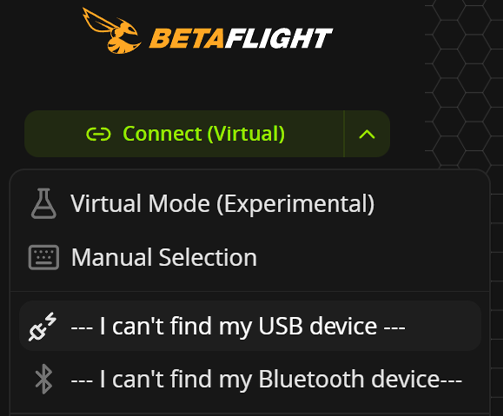
-
It should open a native browser dialog to select the device you want to connect to.
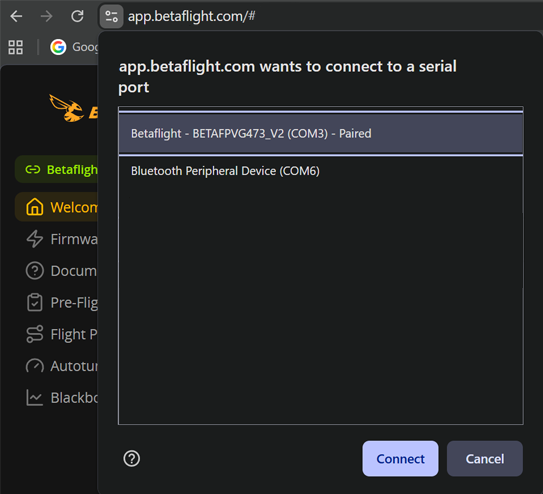
-
After you select the device and click
Connect, you should be able to see your flight controller in the port selection and you don't need to add it again the next time you connect it.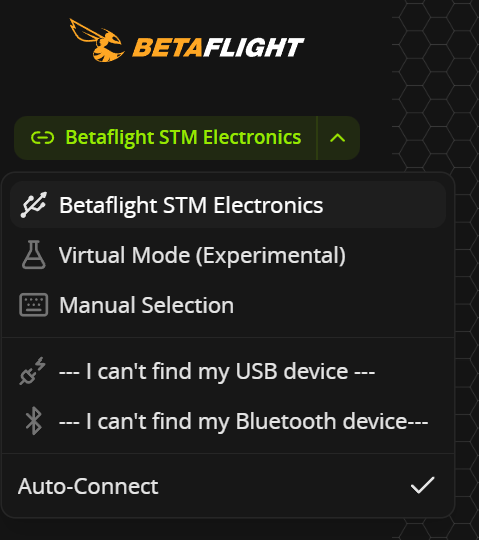
-
When you have a device selected in the port selection dropdown, you can click the
Connectbutton to connect it to the App itself to access the various tabs and features.
The web app supports connecting to supported flight controllers wirelessly via Bluetooth. It's compatible with all flight controllers that are supported by the SpeedyBee mobile app, and some additional hardware that's exclusively supported by the Betaflight App.
The connection process is largely the same as the USB connection:
-
When you first want to connect, you will need to select the
I can't find my Bluetooth devicefrom the port selection dropdown in the top right.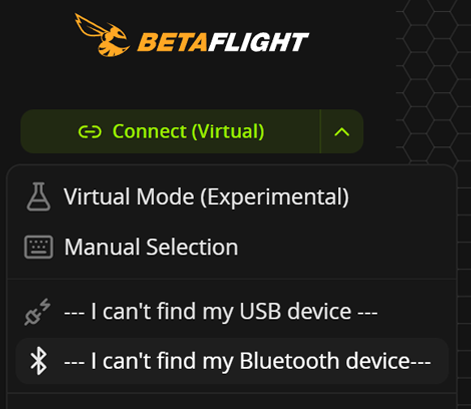
-
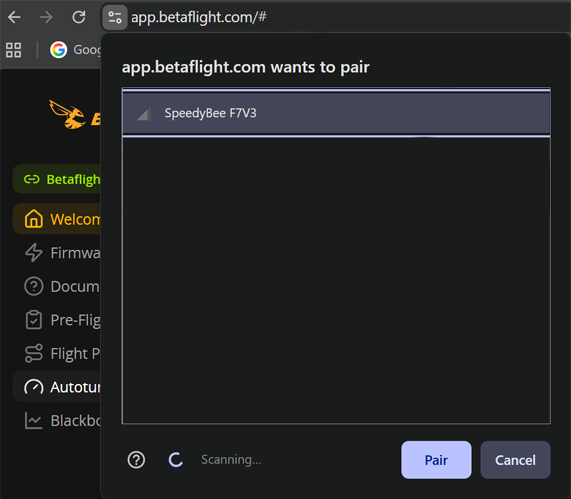
It should open a native browser dialog to select the device you want to connect to.
-
After you select the device and click
Pair, you should be able to see your flight controller in the port selection and you don't need to add it again the next time you connect it.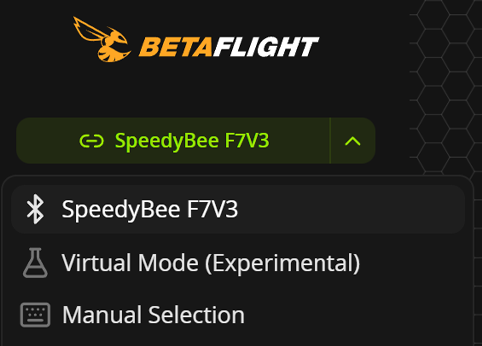
-
When you have a device selected in the port selection dropdown, you can click the
Connectbutton to connect it to the App itself to access the various tabs and features.
-
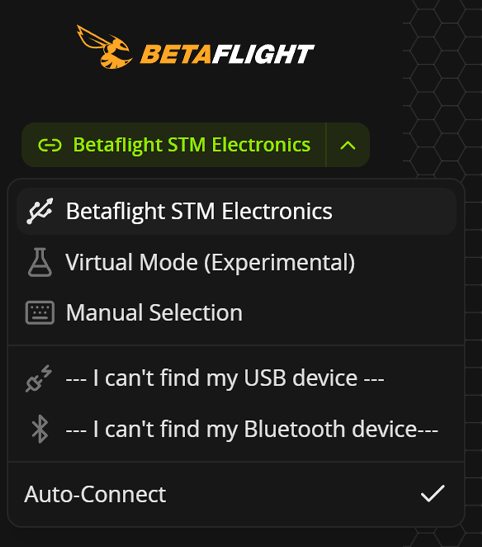
When using the App as a native program (older versions or on Android), you should be able to see your flight controller in the port selection dropdown in the top right as soon as you connect it via USB.
-
When you have a device selected in the port selection dropdown, you can click the
Connectbutton to connect it to the App itself to access the various tabs and features.
This feature is still "work-in-progress" as of the 2025.12.1 release. Please report any issues you find with this feature by opening an issue on our GitHub tracker.
The latest (2025.12.1) version of the App supports connecting to flight controllers through ELRS receivers via Wi-Fi TCP/IP on mobile devices.
- Ensure that the
Enable manual connection modesetting is enabled in theOptionstab.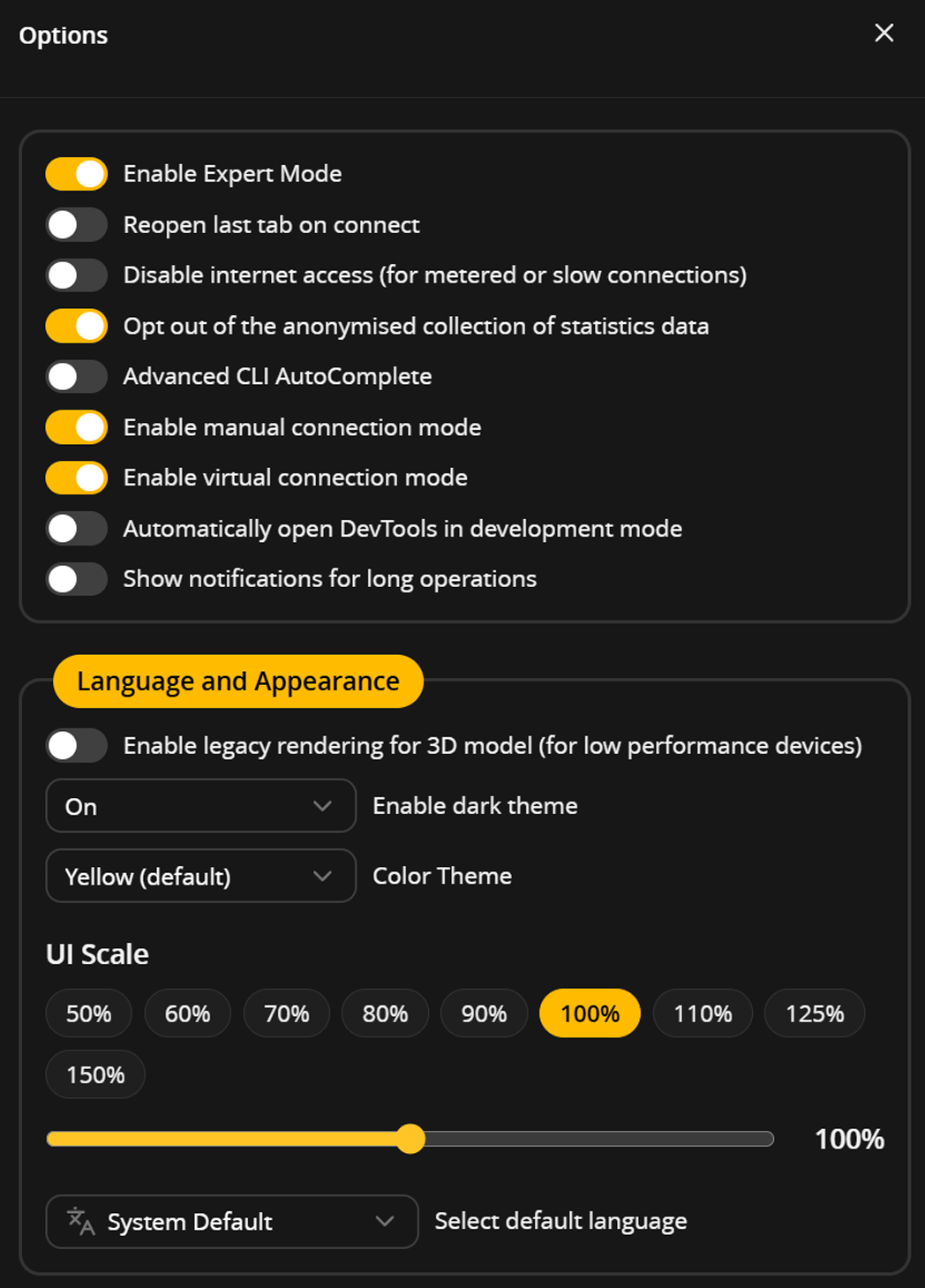
- Connect to your ELRS receiver via Wi-Fi, or connect to the same network that the receiver is set up to use.
- Select
Manual connectionfrom the port selection dropdown and enter in either10.0.0.1if you're connected to the receiver directly, or its local IP address if you're connected to the same network.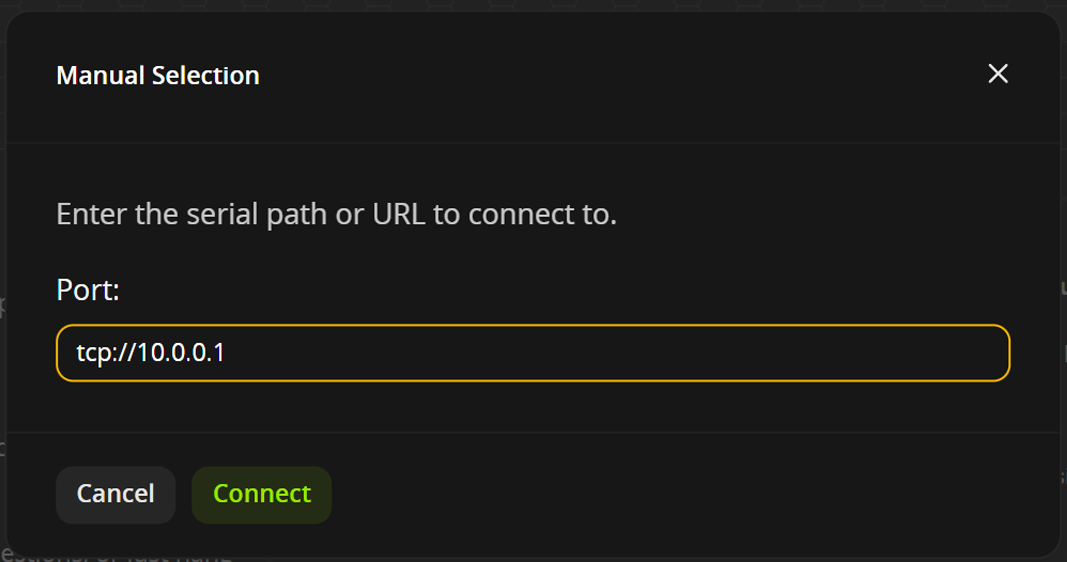
- Click the
Connectbutton to connect to the flight controller.
Connection Issues
The Troubleshooting page covers some of the most common connection issues you may encounter. If you're still having trouble connecting, you can join our Discord server and ask for help in the support channels with a brief description of the issue. Please avoid using LLMs or other AI tools to help you troubleshoot your connection issues, as they often provide incorrect or misleading information that can make the problem worse.
Why the move to a web app?
... And what's with the new version numbers while we're at it?
If you've been flying for a little while now, you are most likely used to the native Configurator app that was available for Windows, macOS, Linux and Android. Basically the one you had to manually download and install on your device to use. With this latest release, you may be wondering why we decided to move to a web app instead of continuing to develop the native one. You might also have some reservations about using a "glorified website" to set up your fleet.
What follows is a not-quite-short history of the Configurator, hopefully painting a clearer picture of what was going on behind the scenes, and hopefully with more human-like language - or as close as we can get as software developers.
History
If you're a very seasoned pilot - read "before 2017 or so" - you may remember that there was a time when Betaflight Configurator was a "Chrome App", available from the Chrome Web Store (yes, the same place where you get extensions nowadays). Chrome Apps were a way to package web apps into a more native-like experience on desktop, with the APIs necessary to use USB.
The Configurator was very much a "glorified website" since the very beginning.
Going from version 0.24 in 2014 back in the Baseflight days, we got to 1.9.4 in 2017, making the jump to version 3.1.4 shortly after, which made the Configurator version string match the Firmware.
Nothing good lasts forever, versioning parity stayed around for less than a year. Chrome Apps were set to be deprecated in 2018 - and that meant that everything had to move. The Configurator was ported over to NWJS, a framework that allowed the devs at that time to easily package the Chrome App into a native-like experience on desktop without relying on deprecated tech. And with Release 10.0.0 in December 2017 we got a native Configurator for Windows, macOS and Linux... and a versioning system split that haunted many beginners for years to come.
As the years went by, the Configurator was updated and improved in tandem with the firmware, and in Release 10.7.0 in June 2020 we got a native Configurator for Android. Specifically, it was packaged with Cordova, once again a tool that let us wrap web technologies in a native package. You may have noticed the pattern here, we've been wrapping web code in whatever native box was available at the time for years.
Current Day
Fast forward a few more years, and we're in the later parts of 2024/early 2025, after the release of Configurator 10.10.0. NWJS and Cordova have been a part of the Configurator for nearly a decade. Making development increasingly slow, getting harder and harder to maintain within our app, and they were starting to show their age. At the same time, native browser technologies were making steady progress. Enough progress to the point where it was viable to take the existing code, take it out of the native wrappers that once gave us lower-level access, but now only served to hinder development, and make it available as a plain web app.
Which is exactly what we've been working on since the 10.10.0 release. Along the way, we got a pretty good UI facelift, Bluetooth support, and much more. Not having to deal with aging technologies allowed development to move a lot faster, and made it more accessible to new contributors. Compared to the 27 contributors for release 10.10.0, we have 43 contributors for release 2025.12.1. This release follows the new Firmware versioning convention, hopefully staying around for longer than a year this time.
It's not all as easy as we'd like it to be though. Native access from a web browser on mobile isn't at the same level as it is on desktop just yet. The web app in a mobile browser should at least support Bluetooth, for USB and ELRS TCP you need to use the new native app. But the aging Cordova framework has also been replaced with a modern alternative - Capacitor, which should be a lot more flexible without impacting development.
Most pilots can use the App directly in their desktop browser without having to download and install anything. To those who are coming back to the land of Chromium after using Firefox for while we'd like to say thanks for giving it a chance. Life is not so horrible on the metal browser family with all the progress that was made in the non-google side in the past few years. (Author note: I still prefer Firefox-based Zen for most of my work, but Chromium has its place as well.)
The Future
Much like the firmware, the App has been made a lot more modular and easier to maintain across different platforms. Maybe we can see more native options in the future again. In the meantime, we're working on bringing the rest of the app to modern standards. We've seen a lot of progress moving more and more of the codebase from jQuery to Vue, a much more modern framework. This should further encourage new contributors who may not be familiar with this aging technology to help out with the project.
As of the time of writing, 2025.12.1 has just been released a few days ago. Since we don't require pilots to download and install every new patch version for the most part, the App will continue to be available at the main URL as ongoing fixes and improvements are added, unlike previous versions which stayed on the initial release for the whole cycle. The eventual Betaflight App release 2026.6 will be made available on the main URL, and release 2025.12.x will be moved to a separate URL.